
Where to answer
One at a time. Swipe a row on the run's page, or on one of its steps, and choose Keep or Only here. After Only here, the same swipe says Count it, which takes it back.
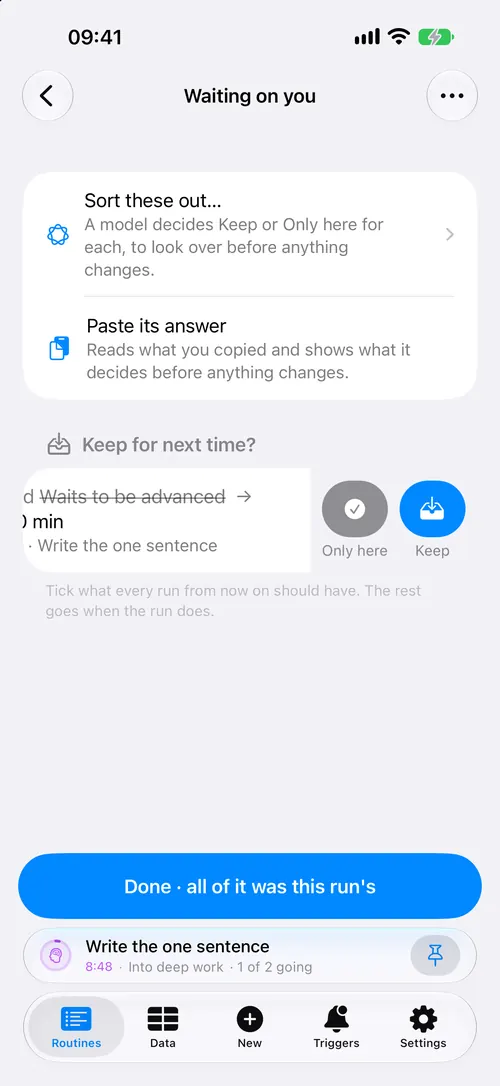
All at once. The orange band at the top of the run says how many are waiting, for example "3 things go when this run does". Press Review. The Waiting on you screen lists every one, wherever in the run it is:
- Swipe a row for Keep or Only here.
- Or tick several and open the menu at the top: Keep the ticked, or The ticked are only for this run.
- Sort these out… asks an assistant, and shows its answers before anything changes. See Describe it.
Finished runs can be answered too. Open the run from Runs.
What Keep does
- A value or a note moves onto the routine. The next run reads it from there.
- A step changed in the run, such as its name, length or count, has the change written into the routine's step.
- A step the run added becomes a step of the routine, where the run had it.
- A trigger, a reaction, or the run's own Lock Screen buttons become the routine's.
- A change to one round is written into the step the rounds are made from. See Again and rounds.
What Only here does
Nothing is moved, copied or deleted. The thing stays with this run and in its history, and its orange mark turns grey. The next run starts without it.
To change your mind, open Review, press Show the ones already answered, and keep the one you want.
What is never asked
Check-ins, a step taken out with Not in this run, and a round's own name and number are about today by nature, so they are never counted. The full list is in What the band counts.
When something goes wrong
- The band will not reach nought. Open Review. It lists everything the band counts, including things on steps you have not opened.
- An old run has no band. Its routine was archived, and there is nothing left to keep into. Take the routine out of the archive, and the questions come back.
- You kept something by mistake. Keep changed the routine, so change it back on the routine's page.