
Where to find it
- One routine: its page, the ellipsis, Export. Or hold its row in the list.
- Several: in the Routines list, open the ellipsis, choose Select, tick them, and press Export in the bar at the foot. They travel together, so one routine that starts another arrives wired up.
- Every routine: Settings › Storage › Export the routines.
The Export page
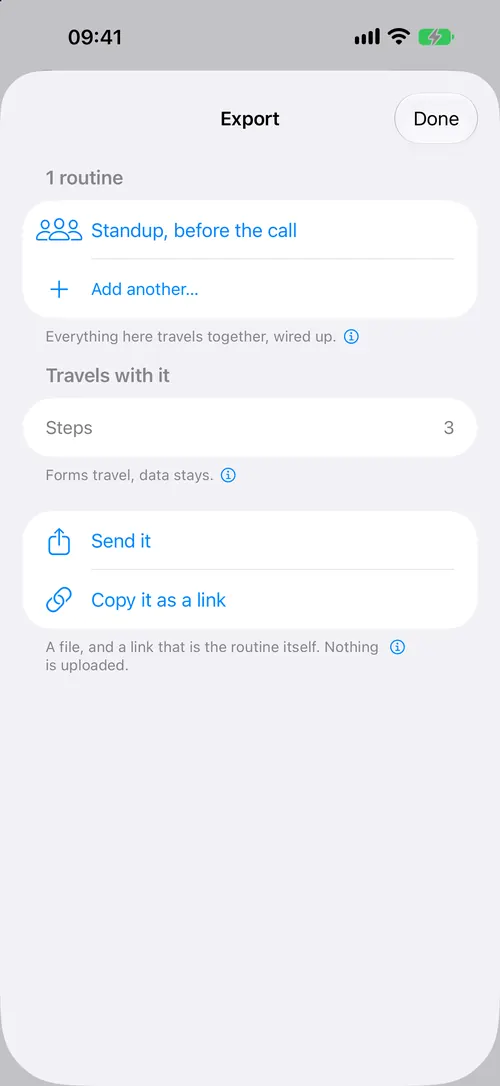
It shows what will travel before anything is sent:
- Travels with it: the steps, and the notifications, forms, statuses and notes the routines use.
- Entries it names: an entry is yours, so by default it stays. For each, choose Leave it here, Send it empty, or Send it as it is.
- Shortcuts it calls: iOS lets nothing install a shortcut for somebody. Give each one an iCloud link, or say what it should do, so the other person can make it.
- How it has been started: automations live in Shortcuts and cannot travel, so this is the list of what to set up again.
Then:
- Send it shares a
.routinerunfile, by AirDrop, Messages, Mail or Files. - Copy it as a link copies an address beginning
https://routinerun.com/r.
What a link carries
The routine itself, packed into the address. It is not a pointer to a copy somewhere else. So it works with no account and no server, and it keeps working for as long as the app can read it.
It also means anyone who has the link can read the routine, the same as any message. It carries what you wrote in the routine, the date you exported it, and the kind of device, such as iPhone. Nothing else identifies you.
A routine carrying many messages, forms or entries is too long for a link. The page then offers the file alone.
Opening one
Tap the link or the file on an iPhone with Routine Run. The Import page shows what came, what it would reach, and which shortcuts you will need. Where you already have that routine from an earlier copy, choose Replace mine or Keep both. A different routine with the same name gets a new name instead. Then Add it (or Replace it). Nothing is written before that.
On a Mac or an Android phone the link opens a web page that says to open it on the iPhone.
Everything, for yourself
Settings › Storage › Back up everything makes one file with routines (the deleted ones too), every run with its history, entries, forms and tags. Put back from a backup… adds what is missing and never writes over anything newer. See also iCloud sync.