
Starting one
On a going run, press Not now…, then one of:
- Check in on this step… for a step waiting on a reply, a parcel or the oven. The step goes to the end meanwhile (Put it at the end meanwhile), so the run is not held up.
- Check in on the run… for a run put down. The run pauses meanwhile (Pause it meanwhile), so its timers do not run on without you.
The sheet has four parts:
- It asks: the question, or empty for the usual one.
- Remind me: on, each time it asks a card goes to the Lock Screen and the watch. Off, it only waits in In hand and on the run's page, marked Due.
- How often: Again and again, every so many minutes, hours or days, or Once, at a time. For minutes and hours, Only between keeps it to part of the day.
- Answers: up to three. A step's are Now, Next and Later, plus Last when the step is not already at the end. A run's are Next step, Pause, Finish and Stop, or Resume instead of Pause when the run is paused meanwhile.
Press Check in.
Answering
Press an answer on the card, or in In hand. Not yet is always there too — a button on the card, and in In hand behind the ⋯ beside the question:
- On the card, it asks again at its next time.
- In In hand, it hides until then, and an interval starts counting again.
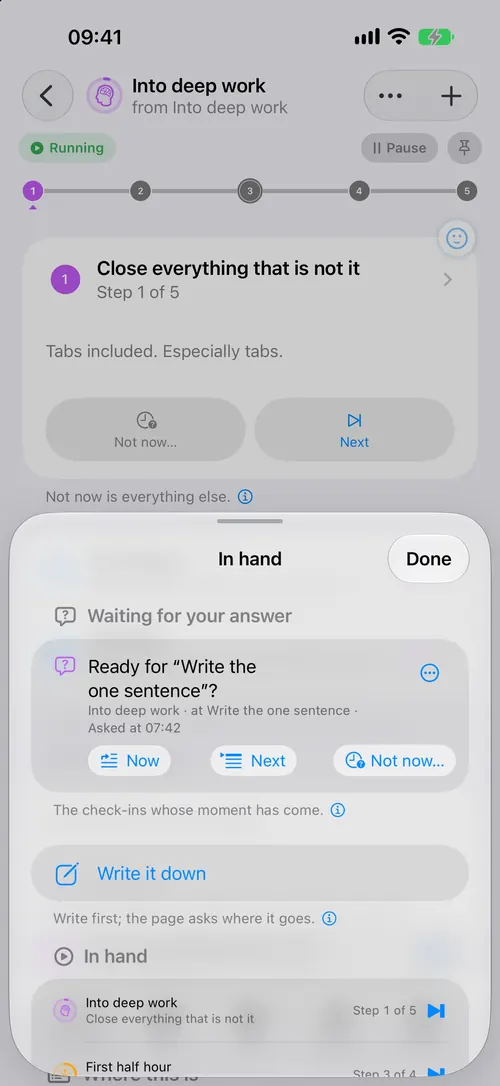
Once answered, it stops asking and says what it was answered. Ask again starts it over.
Decide later, on the Lock Screen card, is a quick one: the step goes to the end and the question waits in In hand, with no card.
Every run of a routine
Open the routine's step, press Not now…, then Check in on it… under "Every run of it, from now on". Each run gets its own question when it reaches that step, counted from that moment.
Good to know
- A check-in goes when its run does, and the orange band never counts it.
- Cards count against the 64 notifications iOS holds for the app. A longer gap or Only between uses fewer.
- They work the same on iOS 26.1 and 27.
When something goes wrong
- It keeps asking. Not yet is not an answer. Press one of the others.
- No card arrives. Remind me is off, or notifications are off for the app. Look in In hand.
- Stop it without answering. Open it and press Stop asking.